Jboss AS7 has a new logging system. It has a centralized configuration. There are only two configuration files a) standalone.xml b) domain.xml. Standalone.xml is used when jboss is running in standalone mode. domain.xml is used in domain mode. It is recommend that these file should be changed only through management api or command line features provided by jboss. It is convenient for the developer to know the standalone.xml. Every thing (almost ) in AS7 is a module or a subsystem. To get desired results one has to locate the subsystem and add his changes. For logging the subsystem is urn:jboss:domain:logging:1.0
There are two handlers <console-handler> and a <periodic-rotating-file-handler>
There can be many <loggers>
The below logger will log every thing from DataNucleus
<logger category="DataNucleus">
<level name="DEBUG">
</level></logger>
This one restricts to JDO
<logger category="DataNucleus.JDO">
<level name="DEBUG">
</level></logger>
Detailed list of loggers are here http://www.datanucleus.org/products/accessplatform_3_0/logging.html
Wait why cant I see the debug logs ? Because you have to increase log level of your preferred handler. I have choosen to log into a FILE as below
<periodic-rotating-file-handler autoflush="true" name="FILE">
<level name="DEBUG">
<formatter>
<pattern-formatter pattern="%d{HH:mm:ss,SSS} %-5p [%c] (%t) %s%E%n">
</pattern-formatter></formatter>
<file path="server.log" relative-to="jboss.server.log.dir">
<suffix value=".yyyy-MM-dd">
</suffix></file></level></periodic-rotating-file-handler></loggers></periodic-rotating-file-handler></console-handler>
Showing posts with label netbeans. Show all posts
Showing posts with label netbeans. Show all posts
Tuesday, August 02, 2011

Friday, July 29, 2011
NetBeans7 integration with Datanucleus JDO
The most important step in developing application with DataNucleus is enhancement of compiled classes. NetBeans provides powerful features for integrating the build enviromnet for Datanucleus with out any need of plugin.
Maven :- NetBeans has a native integration with maven. Any datanucleus project based on maven will open and run as is with netbeans. No changes are needed in the project nor in netbeans.
ANT :- The default build system in netbeans is Ant. Follow through for steps involved. There are two types of enhancement. 1) When we need typesafe queries datanucleus provides annotation processor. 2)Byte Code enhancement by datanucleus enhancer.
Requirements
1. Datanucleus from http://sourceforge.net/projects/datanucleus/files/datanucleus-accessplatform/ choose datanucleus-accessplatform-full-deps-3.0.0-m6.zip it has most of it.
2. http://sourceforge.net/projects/datanucleus/files/datanucleus-jca/ needed if you are working with JavaEE
Setup Libraries for datanucleus
TypeSafe Queries :- Datanucleus generates addtional code for supporting type safe queries. Ensure that "Enable Annotion processing" check box is selected, which is under Project Properties | build | compiling
Enhancer :- Datanucleus provides an ant task to enhancement. This task has to be executed just after compiling all the classes in the project. Open the files tab and localte the build.xml . Paste the below code before the end of
You output screen will show a log smilar as below
The first red line is from the datanucleus annotation processor
Next two red lines are from the ant task we just added
Maven :- NetBeans has a native integration with maven. Any datanucleus project based on maven will open and run as is with netbeans. No changes are needed in the project nor in netbeans.
ANT :- The default build system in netbeans is Ant. Follow through for steps involved. There are two types of enhancement. 1) When we need typesafe queries datanucleus provides annotation processor. 2)Byte Code enhancement by datanucleus enhancer.
Requirements
1. Datanucleus from http://sourceforge.net/projects/datanucleus/files/datanucleus-accessplatform/ choose datanucleus-accessplatform-full-deps-3.0.0-m6.zip it has most of it.
2. http://sourceforge.net/projects/datanucleus/files/datanucleus-jca/ needed if you are working with JavaEE
Setup Libraries for datanucleus
- Datanucleus - Containing all files from lib folder
- Datanucleusdeps - Containing all files from deps folder
TypeSafe Queries :- Datanucleus generates addtional code for supporting type safe queries. Ensure that "Enable Annotion processing" check box is selected, which is under Project Properties | build | compiling
Enhancer :- Datanucleus provides an ant task to enhancement. This task has to be executed just after compiling all the classes in the project. Open the files tab and localte the build.xml . Paste the below code before the end of
<target name="-post-compile" depends="init">
<path id="module.enhancer.classpath">
<pathelement path="${javac.classpath}"/>
<pathelement location="${build.classes.dir}"/>
</path>
<taskdef name="datanucleusenhancer" classpathref="module.enhancer.classpath"
classname="org.datanucleus.enhancer.tools.EnhancerTask" />
<echo message="start datanucleusenhancer"/>
<datanucleusenhancer classpathref="module.enhancer.classpath" dir="${build.classes.dir}" verbose="true">
<fileset dir="${build.classes.dir}/com/blogspot/jkook/daytrader/jdo/">
<include name="**/*.class"/>
</fileset>
</datanucleusenhancer>
<echo message="end datanucleusenhancer"/>
</target>
You output screen will show a log smilar as below
Compiling 5 source files to /NetBeansProjects/JDOTutorial/build/web/WEB-INF/classes

DataNucleus : JDO Query - com.blogspot.jkook.daytrader.jdo.JDOOrderData -> com.blogspot.jkook.daytrader.jdo.QJDOOrderData

Note: Some input files use unchecked or unsafe operations.

Note: Recompile with -Xlint:unchecked for details.

Copying 2 files to /NetBeansProjects/JDOTutorial/build/web/WEB-INF/classes

start datanucleusenhancer

Jul 29, 2011 2:40:36 PM org.datanucleus.enhancer.DataNucleusEnhancer

INFO: DataNucleus Enhancer : Using ClassEnhancer "ASM" for API "JDO"

Jul 29, 2011 2:40:37 PM org.datanucleus.enhancer.DataNucleusEnhancer main

INFO: DataNucleus Enhancer (version 3.0.0.m6) : Enhancement of classes

DataNucleus Enhancer (version 3.0.0.m6) : Enhancement of classes

Jul 29, 2011 2:40:38 PM org.datanucleus.api.jdo.metadata.JDOAnnotationReader processClassAnnotations

INFO: Class "com.blogspot.jkook.daytrader.jdo.JDOOrderData" has been specified with JDO annotations so using those.

Jul 29, 2011 2:40:38 PM org.datanucleus.metadata.MetaDataManager loadClasses

INFO: Class "com.blogspot.jkook.daytrader.jdo.QJDOOrderData" has no MetaData or annotations.

Jul 29, 2011 2:40:38 PM org.datanucleus.enhancer.AbstractClassEnhancer save

INFO: Writing class file "/NetBeansProjects/JDOTutorial/build/web/WEB-INF/classes/com/blogspot/jkook/daytrader/jdo/JDOOrderData.class" with enhanced definition

Jul 29, 2011 2:40:38 PM org.datanucleus.enhancer.DataNucleusEnhancer addMessage

INFO: DataNucleus Enhancer completed with success for 1 classes. Timings : input=514 ms, enhance=290 ms, total=804 ms. Consult the log for full details

DataNucleus Enhancer completed with success for 1 classes. Timings : input=514 ms, enhance=290 ms, total=804 ms. Consult the log for full details

end datanucleusenhancer


compile:

compile-jsps:

Created dir:  /NetBeansProjects/JDOTutorial/dist

Building jar:  /NetBeansProjects/JDOTutorial/dist/JDOTutorial.war

do-dist:

dist:

BUILD SUCCESSFUL (total time: 6 seconds)
The first red line is from the datanucleus annotation processor
Next two red lines are from the ant task we just added
Friday, November 17, 2006
Sorting and Paging with EJB Alternatives
A rather clean approach would have been EJB returns a List, Bind the List to Table Component . Thats-it every thing has to work. There are two intresting problems to solve
1) Sorting :- The Table component does its own sorting. It does not use database sorting capabilities nor ejb facilities. Solution is writing TableSorter and bind it to the TableComponent.
2) Paging :- The dataprovider performs the job of paging. Dataprovider interface provides getRowCount(),getRowKeys(int count, RowKey afterRow). The strait forward approach will be overwrite these methods in the custom dataprovider. But intrestingly the TableComponent has a bug. It always call this method with afterRow=null. As a result we cannot use inbuilt paging features of the Table Component. Final solution is to write addtional methods in dataprovier to handle paging and call these methods from buttons/links on the webpage.
Other options
Using Standard table component : Supports paging ,Does not support sorting, Does not support themes.
Not using Dataprovider : Jsf page still works with out dataprovider. We loose on visual binding of fields with the Table component. The TableLayout screen will not work.
Scope of Dataprovider and Table sorter : Dataprovider can be move to page scope by moving the maxresults and starPosition variables to session. Table Sorter cannot be moved out of session scope.
Desired Solution
NetBeans should some how automatically generate dataprovider, delegate paging and sorting to ejb layer. Table componet has to be- smarter :)
Paging and Sorting in ejb3 Analysis
Netbeans 5.5 VisualWeb Pack is a lovey tool for rapid application development. It is the best solution for your visual development. It lacks few features which are available in its cousin Sun Studio Creator(SJSC). For example in SJSC one can drag an EJB component on to a table. The table automatically re-draws itself to show all the filelds exposed by the draged ejb. I have experimented with Netbeans 5.5 to understand how to use visual development of a web application along with the ejb projects.
The new process is
Create EJB project as usual , Create VisualWeb application
Write a custom Dataprovider by extending ObjectListDataProvider and Write a Custom Sorter extending TableDataSorter
Handle paging in DataProvider
Handle Sorting in TableDataSorter
Add Dataprovider and TableDataSorter as properties of SessionBean1 , Bind these properties to the table component.
Add Button ui components to your page which will handle the paging events.
I have explaind the detailed process in my previous blog
Sorting and Paging with EJB3
In this article we shall use NetBeans Visual Web Pack 5.5 to create and deploy an ejb3 application along with a web application. The application has two parts. A) An Enterprise application using ejb3 B) A Web application which displays a data grid with sorting and paging. Netbeans has wizards which can manage sorting and paging data bound to a database table. Here we shall see how to achive this features using ejb.
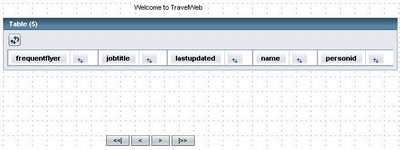
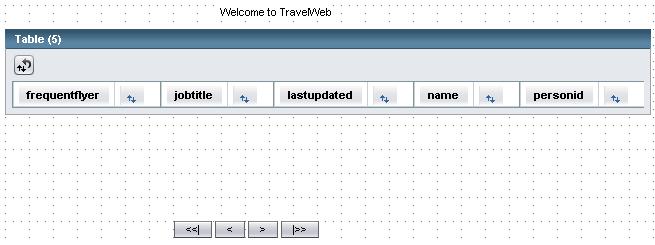
At the end you build a travel web application as shown in the figure
ContentsAt the end you build a travel web application as shown in the figure

Prerequisites
Creating Travel EJB application
Creating Entity Classes from Database
Writing StateLess Session Bean
Creating Travel Web Application
Creating DataProvider
Adding Table Component
Binding DataProvider
Creating EjbTableSorter
Binding EjbTableSorter
Adding Paging Buttons
Prerequisites
Before you use this tutorial, you must have the NetBeans 5.5 IDE and Visual Web Pack 5.5 installed on your system. Familiarize yourself with the basic parts of the IDE and read the Getting Started With NetBeans Visual Web Pack 5.5 for an introduction to the Visual Web Pack development environment. All steps in this tutorial are based on the default Visual Web Pack project, which uses the JSF 1.2 and Java EE 5 technologies.
Note: To access the TRAVEL database used in this tutorial, you must configure the IDE to use Sun Java System Application Server 9.0 (also known as GlassFish v1 UR1). For information about installing and configuring the Visual Web Pack and the Sun Java System Application Server, see the NetBeans Visual Web Pack 5.5 Installation Instructions.
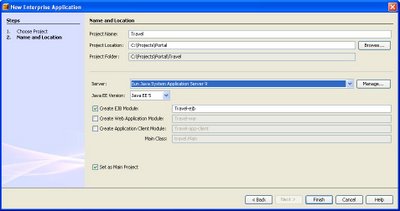
Creating Travel EJB application
- Choose File > New Project (Ctrl-Shift-N) from the main menu.
- Select Enterprise Application from the Enterprise category and click Next.
- Name the project NewsApp and set the server to Sun Java System Application Server.
- Set the J2EE Version to Java EE 5, and select Create EJB Module and Create Web Application Module, if unselected.
- Project Name = Travel
- Select a Project Location
- Uncheck create web-application module and Create Client module
- Click Finish.
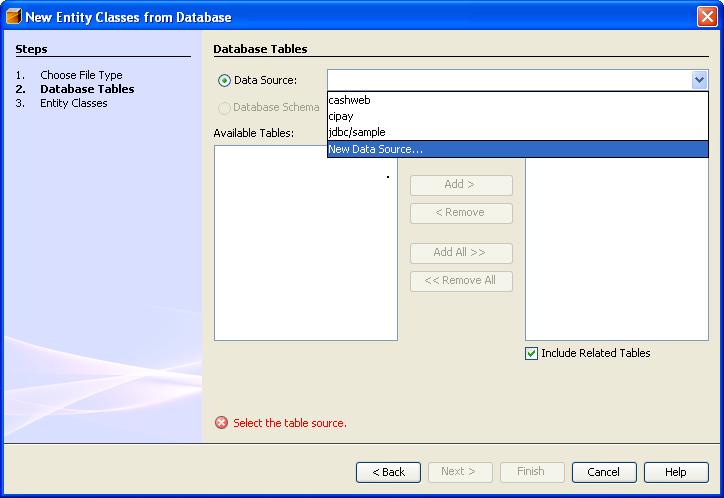
- Right click Travel-ejb project
- Select New Entity Classes form Database
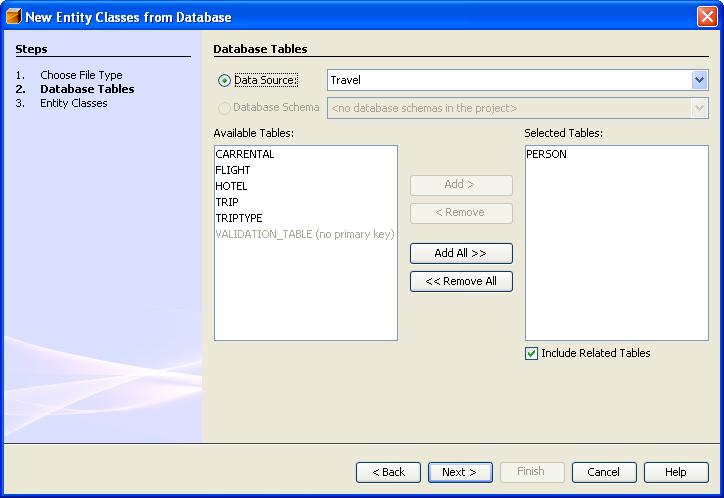
- Create a new DataSource
- Add a datasource
- Select Person Database Table (next)
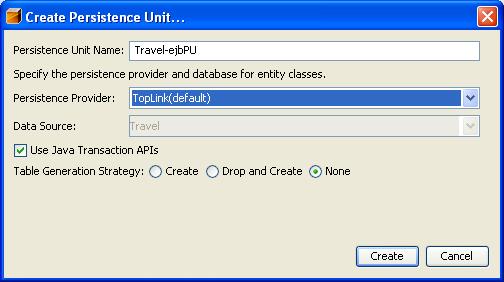
- Click Create Persistance Unit
- Click Create
- Click Finish
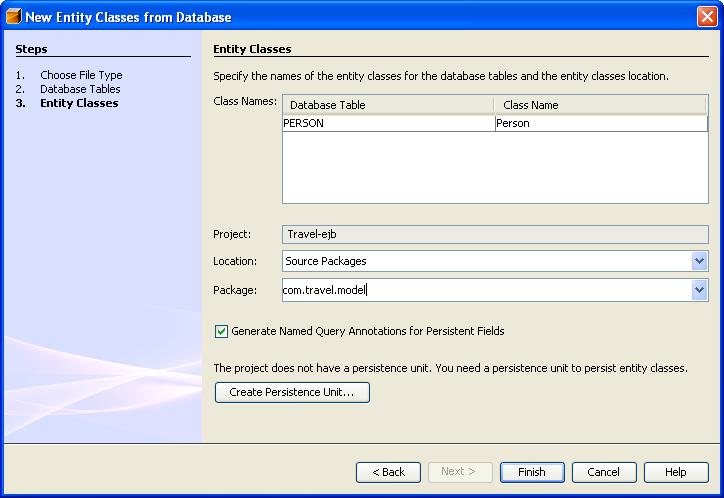
Writing StateLess Session Bean
- Right Click Travel-Ejb Project Select New Session Bean
- Type EJB Name : Person, Package com.travel.service
- Check Remote and Local
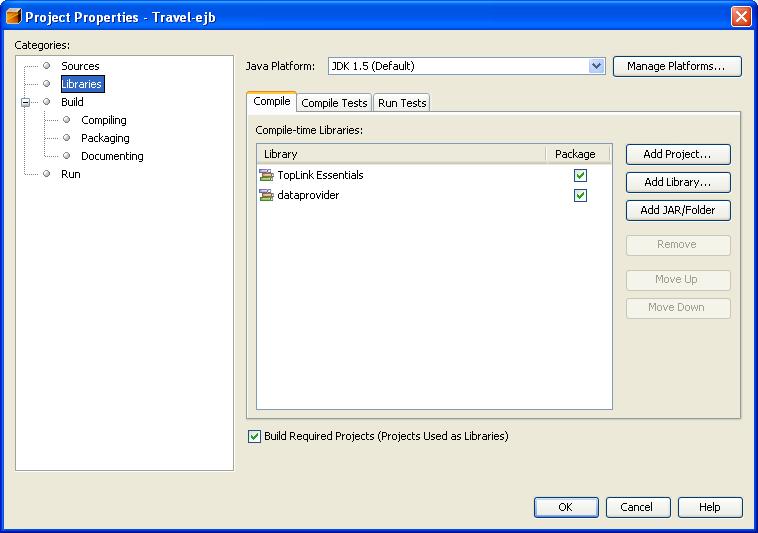
- Add Two Libraries to Travel-ejb . ToplinkEssentials is already available in netbeans. Dataprovider.jar is in following path C:/Sunnetbeans-5.5/rave2.0/modules/ext
- Open PersonBean.java. Right Click anywhere in
- the code . Add Business Method . Add following methods
- getPersons,getcount
- Build Travel
Here is the code of PersonBean.java
/* Returns sorted list of persons, Nomber of objects returned can be controlled by specifying
maxresukts and startposition */
public List getPersons(int startPosition, int maxResult, SortCriteria[] sc) {
String query = "select object(o) from Person as o";
if(sc != null){
query = query + " " + "order by " + " " + "o."+sc[0].getCriteriaKey();
if(!sc[0].isAscending()){
query = query + " desc";
}
}
Query q = em.createQuery(query);
q.setMaxResults(maxResult);
q.setFirstResult(startPosition);
return q.getResultList();
}
/* Count */
public int getCount() {
Query q = em.createQuery("select count(o) from Person as o ");
Long count = (Long)q.getSingleResult();
if(count != null){
return count.intValue();
}
return 0;
}
Creating Travel Web Application
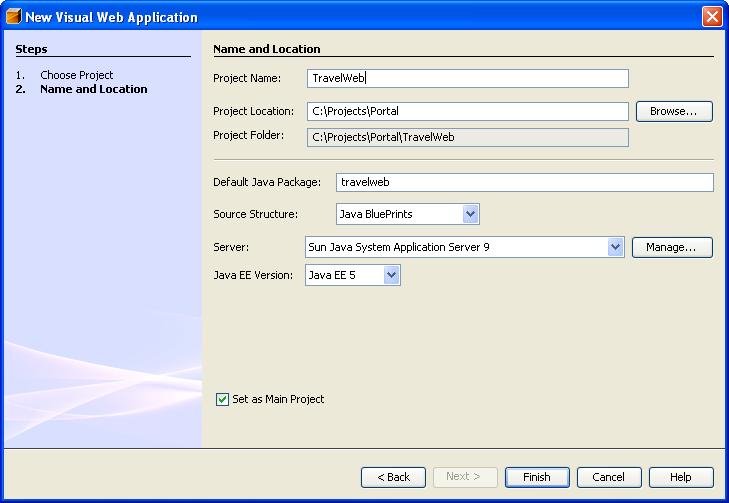
- Create a new Visual Web application
-
- Add Travel-ejb in the Libraries of TravelWeb project
Creating DataProvider
- Create PersonDP.java
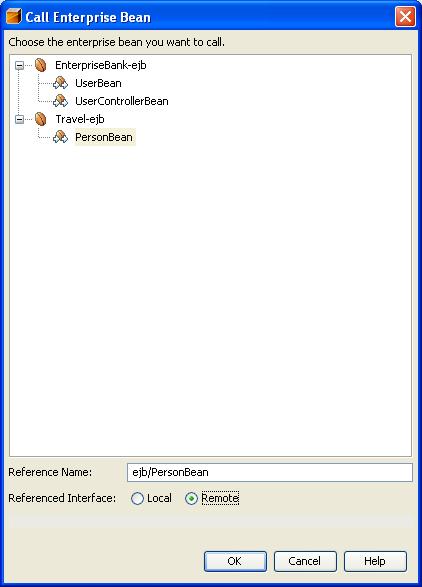
- Right Click any where in the code select Enterprise Resources | call Enterprise Bean
- Select Person Bean
- Add following methods to PersonDP refreshDP,getRowCount,next,previous
- Add two properties startPosition and maxresults
/*
* PersonDP.java
* Created on November 16, 2006, 6:10 PM
*/
package dataproviders;
public class PersonDP extends ObjectListDataProvider{
/** Creates a new instance of PersonDP */
public PersonDP() {
/* needed by netbeans editor */
setObjectType(Person.class);
}
/* fetch a fresh list of persons from ejb layer*/
public void refreshDP(){
clearObjectList();
setList(lookupPersonBean().getPersons(getStartPosition(),getMaxresults(),null));
}
/* Fetch sorted list of persons from ejb layer*/
public void refreshDP(SortCriteria[] sc){
clearObjectList();
setList(lookupPersonBean().getPersons(getStartPosition(),getMaxresults(),sc));
}
/* find count */
public int getRowCount() throws DataProviderException {
if(Beans.isDesignTime()){
return 5;
}
return lookupPersonBean().getCount();}
/* controls page size*/
private int maxresults =5;
/* starting row*/
private int startPosition;
public int getMaxresults() {
return maxresults;
}
public void setMaxresults(int maxresults) {
this.maxresults = maxresults;}
public int getStartPosition() {
return startPosition;
}
public void setStartPosition(int startPosition) {
this.startPosition = startPosition;
refreshDP();
}
public void setLastPosition() {
startPosition = (lookupPersonBean().getCount()/maxresults) * maxresults;
refreshDP();
}
/*move to next page*/
public void next(){
if(startPosition + maxresults <= lookupPersonBean().getCount()){
startPosition = startPosition + maxresults;
}
refreshDP();
}
public void previous(){
if(startPosition < lookupPersonBean().getCount()){
startPosition = startPosition - maxresults;
}
if (startPosition < 0){
startPosition =0;
}
refreshDP();
}
/* Helper for calling ejb service . Created by netbeans*/
private PersonRemote lookupPersonBean() {
try {
Context c = new InitialContext();
return (PersonRemote) c.lookup("java:comp/env/ejb/PersonBean");
}
catch(NamingException ne) {
Logger.getLogger(getClass().getName()).log(Level.SEVERE,"exception caught" ,ne);
throw new RuntimeException(ne);
}
}
Adding Table Component
- Open Page1 in TraveWeb project
- Drag and drop a Table from Pallet window'
- Add a Property to SessionBean1
-
Name of the property is persondp type PersonDP
-
Inittialize private PersonDP persondp = new PersonDP();
-
Clean Build TravelWeb
-
Clean Build Travel-ejb (dont touch travle project)
-
Restart Netbeans
- Open Page 1
-
Right Click table component on the page
-
Select Table Layout
Select persondp in getDataFrom dialog
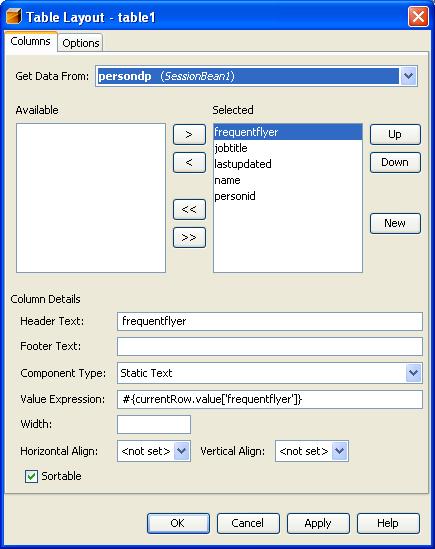 Set Table Layout Options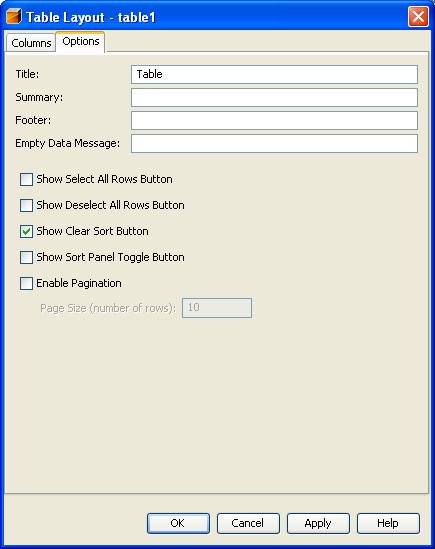
- Create EjbTableSorter.java
- Create a Property ejbTableSorter in SessionBean1
- Initialize ejbTableSorter
/*
* EjbTableSorter.java
* Created on November 16, 2006, 6:42 PM
*/
package dataproviders;
import com.sun.data.provider.DataProviderException;
import com.sun.data.provider.RowKey;
import com.sun.data.provider.SortCriteria;
import com.sun.data.provider.TableDataProvider;
import com.sun.data.provider.TableDataSorter;
import java.beans.Beans;
import java.io.Serializable;
import java.util.Locale;public class EjbTableSorter implements TableDataSorter , Serializable {
/** Creates a new instance of EjbTableSorter */
public EjbTableSorter() {
}
protected SortCriteria sortCriteria[];
protected Locale sortLocale;
/** Creates a new instance of EjbSorter */
public EjbTableSorter(SortCriteria sortCriteria[], Locale sortLocale) {
this.sortCriteria = sortCriteria;
this.sortLocale = sortLocale;
}
public void setSortCriteria(SortCriteria[] sortCriteria) {
this.sortCriteria = sortCriteria;
}
public SortCriteria[] getSortCriteria() {
return sortCriteria;
}
public void setSortLocale(Locale locale) {
this.sortLocale= locale;
}
public Locale getSortLocale() {
return this.sortLocale;
}
/* returns sorted list of keys. Gets frersh sorted list of objects from ejb layer*/
public RowKey[] sort(TableDataProvider provider, RowKey[] rows) throws DataProviderException {
if(!Beans.isDesignTime()){
PersonDP persondp = (PersonDP)provider;
persondp.refreshDP(sortCriteria);
System.err.println(" Executed sort EjbSorter.java");
return persondp.getRowKeys(rows.length,null);
}
return provider.getRowKeys(rows.length,null);
}
}
Binding EjbTableSorter
- Open Page1 in Visual editor
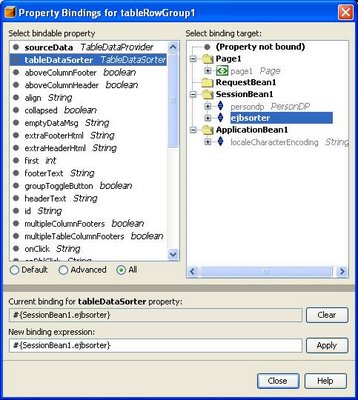
- Select TableRowGroup1 in the Outline window
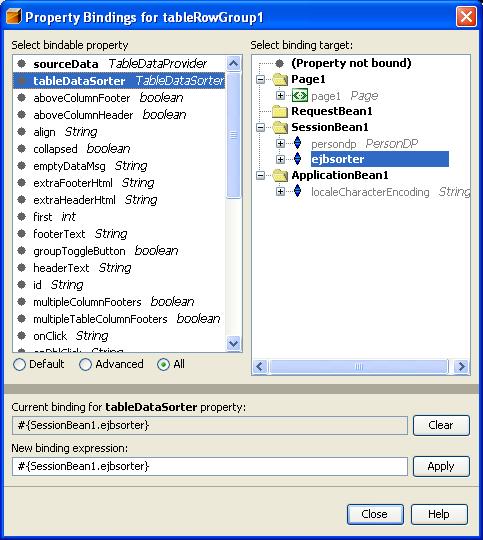
- Rigth Click TableRowGroup1 | Property Bindings
- Select all radio button in Property Bindings
- Select TableDataSorter in left pane
- Select SessionBean1 | ejbSorter in right pane
- close
Adding Paging Buttons
- Open Page1 in visual editor
- Drag and drop GropPanel from pallet windows
- Drag and drop Button from pallet window on to the GroupPanel 4 of them
- Change the text property of each button using property editor
- Double click on the <<| Button
- Add following line getSessionBean1().getPersondp().setStartPosition(0);
- Add following code in each button
- getSessionBean1().getPersondp().previous(); getSessionBean1().getPersondp().next(); getSessionBean1().getPersondp().setLastPosition();
- Deploy Travel Project
- Run TravelWeb
- Voila your your webrowser will look like the screen shot we started with . You can sort the table, navigate the pages. Also the sorting can be removed. Also sorting order is retained even while moving to another page.
Subscribe to:
Comments (Atom)